


myAir™ by Resmed
4.211.17K Reviews
App Specs
- Version
- Varies with Device
- Updated On
- License
- Free
- Downloads
- 1,000,000+
- Developer
- Resmed
- Categories
- Medical
- Platform
- Android, iOS
Screenshots
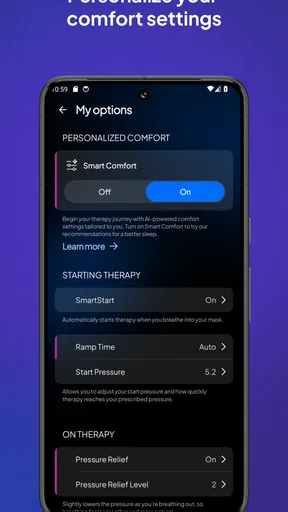
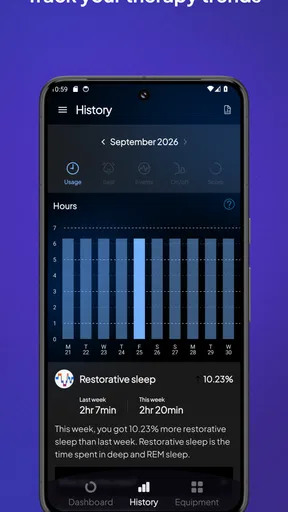
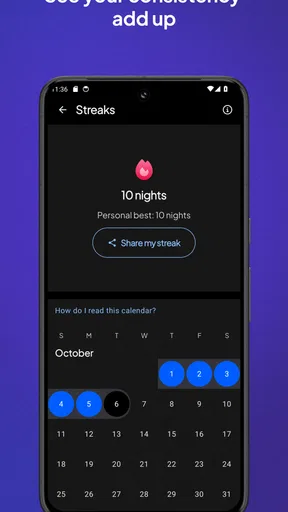
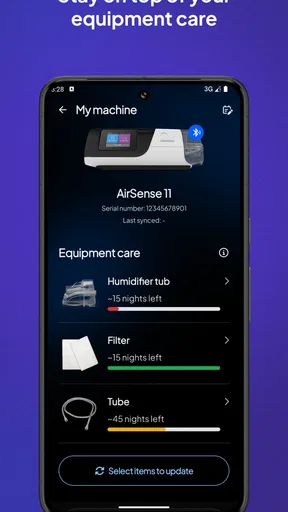
 Analysis by AppCompare
I would think of myAir as a companion to PAP therapy, not as a way to diagnose a sleep problem or decide on treatment by myself. Its value is in giving a user a regular, understandable view of how therapy is going and a nudge to keep showing up. If you are new to this routine, that distinction matters: an app can make the process feel less opaque, but it does not replace your clinician, your equipment instructions, or your own sense of how you feel.
What to expect from a PAP companion
Made by Resmed, myAir™ is a free medical app for people using compatible Resmed PAP equipment. It has an Everyone age rating, an average rating of 4.1 from around 35,000 ratings, and more than a million installs. Those figures suggest that many people find it useful, but they do not mean every user will have the same experience: the app is most relevant when you already use the equipment it is designed to accompany.
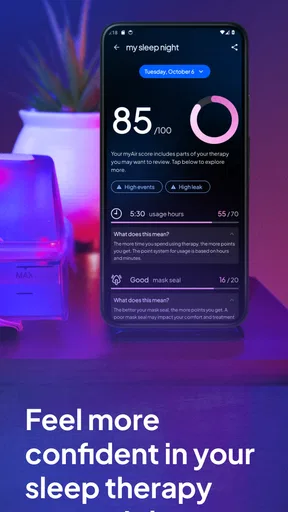
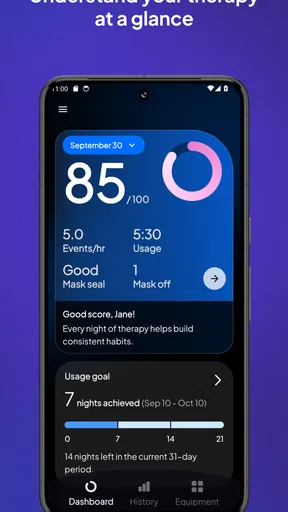
The main appeal is a simple morning check-in rather than a complicated sleep laboratory dashboard. The score and its component categories can help me spot a pattern, such as a run of nights when using therapy consistently is difficult. I would treat that score as a prompt for reflection, not a grade for my health. One low result is not a diagnosis, and a better result does not prove that every concern has been resolved.
Make the first setup a small task
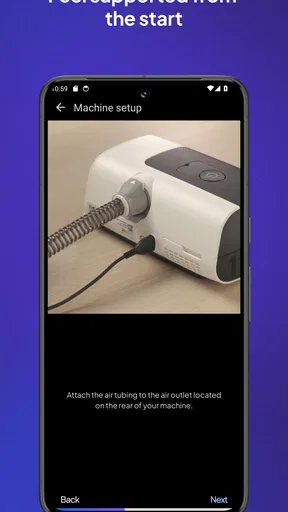
For a first-time user, I would set aside a calm moment to install the app and follow its connection steps with the PAP device nearby. The app is intended to collect therapy information from that equipment, so the first useful step is getting the account and device relationship in place. If you are unsure whether your specific machine can work with the app, check the device information or ask your care provider before relying on it.
Once the connection is in place, give the app a night or two to become part of your routine rather than judging it from the opening screen. A practical habit is to check in after getting up, when you can connect the previous night’s information with what you actually remember: whether the mask felt settled, whether you woke, or whether putting the equipment on took extra effort. That context helps make the figures more useful than looking at them in isolation.
Turn the morning score into a useful next step
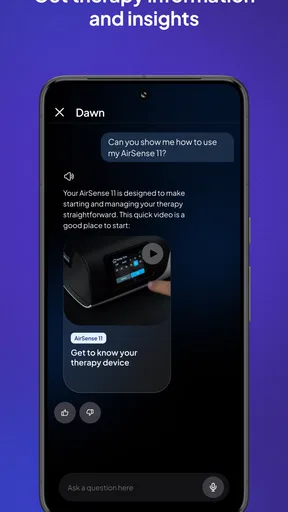
The app presents measures including usage time, mask seal, and apnea events, then pairs the dashboard with tips and videos. I find that combination more approachable than a page of unexplained clinical-looking numbers. If a category changes, the sensible response is to notice it and look for a practical pattern, not to make a major equipment or treatment change on the basis of the screen alone.
For example, if a mask-seal result is repeatedly concerning, I would note when it happens and whether I remember the mask shifting, then take that observation to the provider or equipment team. That is a more grounded use of the app than chasing a perfect score by tightening or changing things without guidance. Likewise, if therapy use is irregular, a small reminder to prepare the equipment before bed may be more actionable than feeling discouraged by a summary the next morning.
Worth Reading Before You Choose

EA SPORTS FC Mobile 26 Is a Bigger Football Game, but It Takes Time

Flipboard Shows What News Apps Must Do Beyond the Feed

Switching to Android Auto Means Rethinking Your Driving Routine

Google Calendar Makes a Crowded Week Easier to Manage

Ludo King Makes the Most of the Minutes Between Plans

Baby Panda World Brings Quick Play to Modern Phones, but Its Game Library Feels Busy
Where it fits—and where it doesn’t
Compared with tracking sleep in a general wellness app or writing notes in a journal, myAir is more directly tied to PAP therapy and can make equipment-related information easier to review. A journal may still be better for recording details the app cannot capture, such as travel, illness, a late meal, or how rested you felt. I would use the two together only if the extra note-taking helps me notice a real pattern; there is little benefit in turning sleep into a second job.
It is also not the right choice for someone who does not use compatible Resmed PAP equipment, or for anyone expecting a broad sleep tracker that independently measures every part of sleep. The app’s focus is its strength, but it is also a boundary. If your main need is clinical interpretation, treatment advice, or help with a symptom, speak with a qualified professional rather than treating an app score as the answer.
A realistic first week
Imagine getting home late after a tiring day, setting up your mask, and waking to a summary that looks different from the previous morning. I would first check the individual categories, then ask what was different about the night: was the equipment put on later, did the mask feel unsettled, or was the night simply unusual? If the same issue appears over several mornings, that repeated observation is more useful to bring to a care conversation than a vague impression that therapy “isn’t working.”
Daily email reports can serve as a gentle reminder for people who like an external nudge, while the dashboard suits someone who prefers to open the app when they choose. The trade-off is that frequent checking can make a single imperfect night feel more important than it is. I would pick one simple check-in time and keep the focus on patterns and consistency, rather than repeatedly refreshing or judging every fluctuation.
Small habits that make the information clearer
A useful habit is to look at the score and its parts together. A summary can be convenient, but the separate categories tell you what kind of issue may deserve attention. Another is to compare similar stretches of routine instead of drawing conclusions from one night after a change in schedule. These are simple ways to avoid overreacting while still making the dashboard part of a thoughtful therapy routine.
The tips and videos are best treated as educational support, not personalized medical orders. I would use them to understand a topic or prepare a question, then check anything that could affect fit, settings, or treatment with the appropriate professional. That division of labor keeps the app helpful without asking it to do a clinician’s job.
Who is likely to appreciate it
I can see this being especially useful for someone starting PAP therapy who wants a low-effort way to build a morning routine and see whether equipment use is becoming consistent. It may also suit an established user who prefers a quick overview to keeping their own manual log. The app’s medical focus and plain presentation make it easier to approach than trying to interpret raw device information without context.
Someone who dislikes tracking, finds scores stressful, or already has a routine that works may not gain much from opening it every day. In that case, occasional checks—or relying on appointments and the device’s usual workflow—may be a better fit. The goal should be to support treatment, not to create pressure to monitor yourself constantly.
Practical questions before relying on it
Will it work with any PAP machine? I would not assume so: it is intended to connect with Resmed equipment, so confirm compatibility for your particular device before making the app central to your routine. Does a low score mean therapy has failed? No; it is a signal to review the component information and context, and to ask a professional if a concern persists. Can the app replace clinical advice? No. It can help you organize observations, but it cannot make treatment decisions for you.
Do you need to check it every morning? Not necessarily. A steady, manageable routine is more useful than a habit that makes you anxious. And if the information does not appear as expected, I would first confirm that the device connection and setup are complete, then consult the app’s guidance or your equipment provider instead of guessing at the cause. That keeps troubleshooting practical and avoids changing therapy settings based on uncertainty.
So, I recently got my hands on the myAir™ by Resmed app, and I've got to say, it's quite a nifty little tool for anyone using CPAP therapy. If you're like me and love keeping track of your health and wellness, this app might just be your new best friend.
Taking the First Breath
Getting started with myAir™ by Resmed was a breeze. The setup is super intuitive, and within minutes, I was all set to dive into the world of sleep data. The app connects seamlessly with your CPAP device, and once you're linked up, it starts collecting all sorts of useful info about your nightly escapades in dreamland.
Diving Into the Data
Here's where it gets interesting. Every morning, you get a personalized myAir score that gives you a snapshot of how well you slept. It breaks down into easy-to-digest categories like usage hours, mask seal, apnea events, and more. It's like having a mini sleep coach right in your pocket! The app even gives you tips and videos to help you improve your scores. How cool is that?
One of the features I really appreciate is the daily email reports. It feels like a gentle nudge to keep me on track with my therapy. Plus, the dashboard is super user-friendly, making it easy to navigate through all the info without feeling overwhelmed.
A Few Breaths of Fresh Air
What sets this app apart is its ability to personalize the experience. It's not just about numbers and stats; it's about making your therapy work for you. The app's insights are tailored specifically to your sleep patterns, helping you make informed decisions about your therapy. You can literally see your progress over time, which is incredibly motivating.
And let's talk about the design. It's sleek, modern, and everything you need is right at your fingertips. No fumbling around trying to find what you're looking for. Just a clean, straightforward interface that gets the job done.
Taking a Breather
In a nutshell, myAir™ by Resmed is a game-changer for anyone using CPAP therapy. It's like having a personal sleep assistant cheering you on every step of the way. Whether you're a data geek like me or just someone looking to get a better night's sleep, this app has something to offer.
If you're curious to try it out, just download the app from your favorite app store, and breathe easier knowing you're on the path to better sleep health. Sweet dreams!
Pros
- User-friendly interface for easy navigation.
- Comprehensive sleep tracking features.
- Customizable alerts for personalized care.
- Detailed insights into sleep patterns.
- Seamless device connectivity.
Cons
- Requires consistent internet connection.
- Limited customization of dashboards.
- App size might be large for some devices.
- Battery usage can be significant.
- Not compatible with all devices.
FAQs for myAir™ by Resmed
What is myAir™ by Resmed?
myAir™ by Resmed is a companion app designed to support users of Resmed CPAP machines. It provides daily sleep data, personalized coaching, and tips to help improve therapy compliance. The app is available on both Android and iOS platforms, offering insights to enhance your sleep therapy experience.
How does myAir™ track sleep data?
myAir™ connects wirelessly to your Resmed CPAP machine to automatically track your sleep data. It collects information such as usage hours, mask seal quality, and events per hour, presenting it in an easy-to-understand format. This data helps users stay informed about their sleep therapy progress.
Is myAir™ compatible with all CPAP machines?
myAir™ is specifically designed to work with Resmed Air10 and AirSense 10 series CPAP machines. If you own a different model or brand, you may need to check compatibility with Resmed or consider alternatives compatible with your device.
Does myAir™ provide personalized coaching?
Yes, myAir™ offers personalized coaching based on your sleep data. It provides tailored feedback and tips to help you improve mask fit, enhance comfort, and maximize the effectiveness of your sleep therapy. These insights empower users to make informed adjustments for better sleep.
Is there a cost associated with using myAir™?
myAir™ is a free app available for download on Android and iOS devices. There are no subscription fees to access its features. However, it requires a compatible Resmed CPAP machine to utilize its full functionality. Ensure your device is supported before downloading.


